


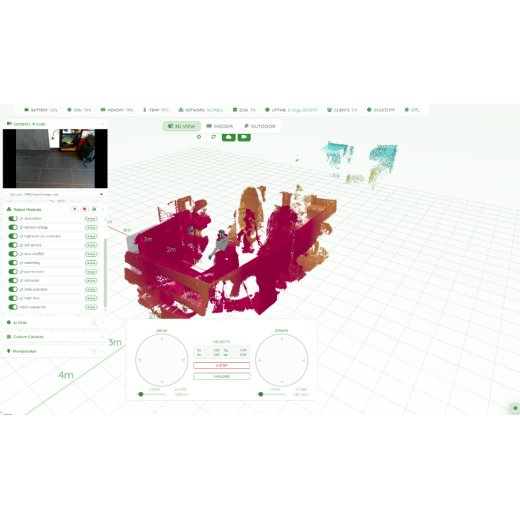
Web server for Robot Use Cases
- SKU: MBS-WEB-01
- Category: Accesoires
-
Manufacturers:

Webserver for Robot Use Cases
- ROS2-based software
- Navigation and mapping
- Speech-to-action
- Monitoring and remote access
Description
Our web server runs directly on the robot and forms the central operating interface for nearly all important functions. The software is based on ROS2 (Robot Operating System 2), a modern standard for professional robotics. All functions are provided via an intuitive web interface, so that the robot can be conveniently controlled and monitored through a normal browser – entirely without additional specialized software or complicated development environments.
Depending on the robot platform and installed hardware, different feature sets may be available. The basic capabilities are described below.
1. Browser-based robot control
The robot can be operated entirely via a web browser. All that is needed is a PC, tablet or smartphone on the same network or – depending on the configuration – also remote access over the internet. Via the graphical user interface you can, among other things:
- start and stop the robot,
- control movements,
- adjust speed,
- execute arm and gripper movements (model-dependent),
- select different operating modes,
- display camera images,
- and conveniently operate further functions.
This eliminates the need to install special robotics software or ROS development tools on the operating computer.
2. ROS2-based software with a graphical interface
The entire software is based on ROS2, a globally established framework for professional robotics. While ROS2 normally requires extensive technical knowledge, our web server handles the graphical presentation of the most important functions. This allows even users without programming or robotics knowledge to complete many tasks directly via a clear user interface.
The web server acts as the central interface between the ROS2 components and the user. Complex background processes remain hidden, while operation is simple and intuitive.
3. Speech-to-action – control by voice
The robot can process natural language commands and derive concrete actions from them. Examples include:
- "Go to the kitchen."
- "Drive to the meeting room."
- "Start your inspection round."
- "Return to the charging station."
For such commands to work reliably, the environment must first be mapped. Target points or rooms are then defined that voice commands can refer to. Depending on the project, individual voice commands and sequences can additionally be set up.
4. Conversations with the robot
Via an integrated AI assistant, the robot can communicate with people. Possible areas of use include, for example:
- welcoming visitors,
- answering frequently asked questions,
- product or company information,
- support at trade shows,
- reception and service tasks,
- simple everyday dialogues.
The robot can respond to both spoken language and text input and generate appropriate answers. The scope and quality of the conversations depend on the AI solution used and the respective project integration.
5. Navigation, mapping and autonomous movement
For autonomous driving or walking movements, the environment is first captured using SLAM (Simultaneous Localization and Mapping). The robot creates a digital map of its surroundings and can then orient itself autonomously within this map. After successful mapping, the following functions are possible, among others:
- autonomous navigation between defined target points,
- waypoint navigation,
- recurring driving or walking routes,
- defined patrols,
- no-go zones,
- virtual restricted areas,
- automatic return to the charging station (model-dependent),
- obstacle detection and avoidance (depending on sensors and robot model).
This makes the robot suitable both for indoor spaces and – with suitable hardware – for certain outdoor areas.
6. Monitoring, live data and remote access
Via the web server, all important operating data of the robot can be monitored centrally. This includes, for example:
- live camera images,
- map view,
- current position,
- battery status,
- sensor data,
- telemetry,
- diagnostics,
- error messages,
- system status,
- network status.
Depending on the system configuration, access can be either local within the network or via a secure remote connection. This allows robots to be monitored or operated remotely as well.
7. Automation and recurring routines
A particular advantage of the platform is the ability to automate recurring processes. Defined routines can be created and re-executed at any time. Typical examples are:
- regular inspection rounds,
- security and control patrols,
- building surveillance,
- production checks,
- warehouse checks,
- visitor tours,
- recurring transport tasks.
At every defined waypoint, individual actions can be triggered. Examples include:
- taking photos,
- starting video recordings,
- measuring temperature,
- recording measured values,
- scanning QR or barcodes,
- playing announcements or warning messages,
- transmitting data to external systems,
- reading out sensors,
- starting individual customer processes.
Which functions are available depends on the installed hardware and the respective project requirements. For special applications, additional sensors, thermal imaging cameras, temperature modules, gas detectors or other measuring systems can be integrated.
8. Expandability and individual customizations
Since the web server is based entirely on ROS2, the system can be flexibly expanded. Depending on the project, additional functions can be integrated, for example:
- connection to building management systems,
- industrial and PLC interfaces,
- MQTT,
- REST APIs,
- databases,
- ERP or MES systems,
- IoT platforms,
- AI models,
- image recognition,
- object detection,
- person detection,
- customer-specific dashboards,
- individual automations and workflows.
This makes the platform suitable both for demonstration systems and for professional industrial, research, security and service applications.
Important note on water and weather protection
Quadruped and humanoid robots are not inherently water- or weatherproof. They should therefore not be used in damp, wet or permanently weather-exposed environments without prior technical verification. Only certain robot models have a specified protection against dust and water. Examples are:
- Unitree B2 with protection class IP67
- Unitree A2 with protection class IP66
Before any use in security, inspection, industrial or outdoor applications, it should therefore be checked
- which IP protection class the respective robot model has,
- what environmental conditions prevail on site,
- and whether additional protective measures are required.
Particularly in the case of rain, splash water, high humidity or heavily soiled deployment sites, this point is of decisive importance for safe and reliable operation.
Reviews
There are no reviews yet.

